What’s New for Evolve Owners: Summer 2026 Product Release


Whether you own one home or you’re operating a growing portfolio, Evolve’s promise stays the same: deliver performance, simplicity, and peace of mind. In the Summer 2026 Product Release, CEO Brian Egan walks through the updates we built around exactly that. Check out the full breakdown with screenshots included, or watch the four-minute video below.
Enhancing Your Owner App Experience
Everything in this release came directly from owner feedback. We spent time listening to what was slowing owners down and built solutions around it, starting with the calendar.
Calendar Enhancements
Why it matters:
A calendar is only useful if you can actually find what you need in it. When settings are buried or hard to locate, quick changes take longer than they should.
What’s new:
Your calendar is reorganized so settings sit where you’d expect them. A new search bar also lets you jump straight to something specific: search “minimum rate,” for example, and you’re shown a list of matching options you can access with one click.

You’ll also find guidance on how to optimize those settings. That way, your Owner App is helping you make the most of your options instead of just showing them to you.
Self-Serve Settings
Why it matters:
Some of the changes owners had to contact us for in the past were quick, day-to-day decisions. Those shouldn’t require a phone call to make.
What’s new:
The following updates are now available directly in your Owner App:
- Booking notice window (how much advance notice you need before accepting a booking)
- Turnover days between stays
- Check-in and check-out day preferences
- Pet fees (on or off, anytime)
- Listing content, including your headline and description
- Your own photos, uploaded directly for professional editing

Check-in and check-out day preferences work the same way: Pick the days that fit your turnover schedule, right from the same settings panel.

AI-Assisted Guest Review Responses
Why it matters:
Quickly posting thoughtful, well-written responses to guest reviews protects your rating, but drafting one for every review takes time.
What’s new:
The Owner App now surfaces the key points from each guest review and drafts a response for you to edit. Evolve’s team still handles final review and publishing, so nothing goes out without a check.

Protecting Your Peace of Mind
Since introducing Smart Locks this spring, more than 1,000 owners have already made the switch — and asked for more flexibility around how they work.
More Control Over Smart Locks
Why it matters:
A smooth check-in sets the tone for the whole stay, and this release gives owners more control over just that.
What’s new:
Smart Lock owners can now adjust the check-in and check-out times on a guest’s entry code directly in the Owner App.

Plus and Pro owners get one more option here: a second lock on the same listing, ideal for properties with more than one entry point.

Don’t have a Smart Lock yet? Head to the listing page for the property you’d like to connect and click the Smart Locks tab. Evolve integrates with the most popular Smart Lock brands on the market, and integration is included with every management plan.
New Access Controls
Why it matters:
Not everyone connected to your property needs to see the same information. Until now, there was no way to limit what a user could see, and adding or removing that user’s access meant contacting Evolve.
What’s new:
Owners can now add and remove authorized app users themselves, and decide exactly what each person can see. A cleaner might only see what’s needed to turn a property for the next stay, while a guest contact could get full access. This gets more useful the more properties you manage, and Pro owners and operators can assign access individually for each property.
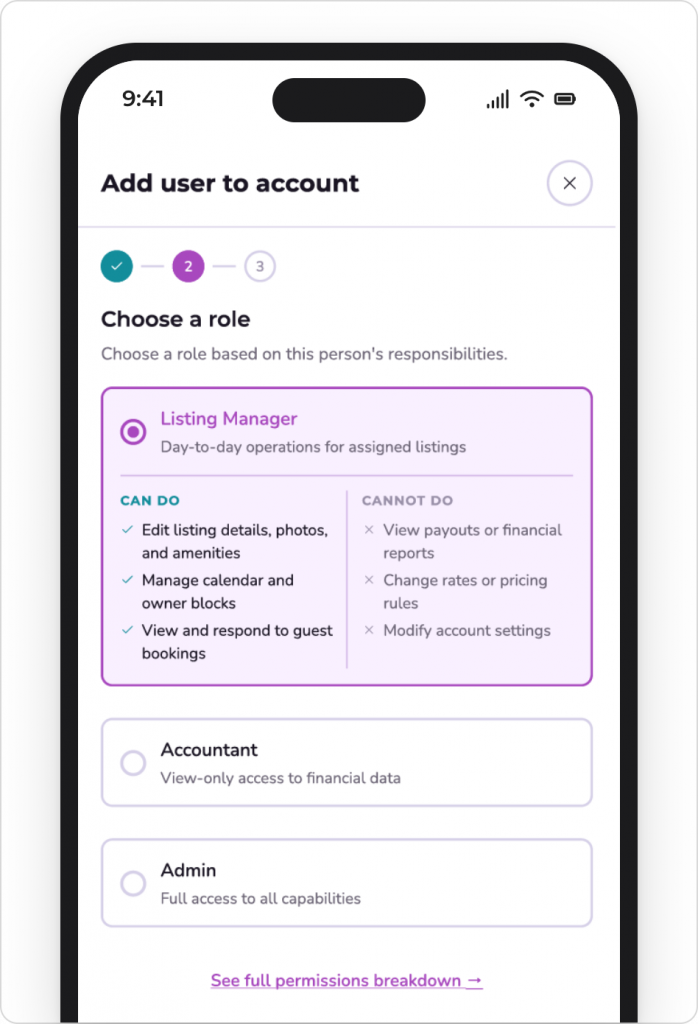
Pro management plan: Assigning unique access by property is just one of the ways Pro is built for owners and operators running more than one property. Pro has every Plus benefit (including a Dedicated Performance Advisor), plus tools built specifically for multi-property operations, like a Dedicated Booking Website, Linked Listings for co-located units, and management fees tailored to your portfolio.

A New Option for Monthly Stays
Why it matters:
Some owners are ready to go all-in on longer stays, and want their property marketed accordingly rather than treated as a standard short-term listing.
What’s new:
The new Mid-Term Rental Add-On is built for owners with minimum stays of 28 nights or more. In addition to the booking sites your property is already listed on, it will also be marketed where extended-stay guests go first: Furnished Finder, Zillow, Apartments.com, and Blueground. Plus, revenue management built specifically for monthly-stay pricing.

Built by Owner Feedback
All of this came from conversations with owners like you — a support call, a survey response, a feature request. That feedback shapes what we build next, and we’re committed to helping owners perform at their best, keeping the experience simple, and giving greater peace of mind along the way.
If you haven’t watched the full update yet, check it out here. To all Evolve owners, thank you for your partnership. We’re excited to keep building with you.
Whether you’re a first-timer just getting started or a seasoned owner looking to expand your portfolio, our team is here to help make vacation rental easy. Fill out the form below to see if you qualify for our services.